

Bilberry uses email to send information to guides and customers, but you can also enable SMS to reach your customers faster. This guide explains how to activate the SMS feature using a Twilio account.
Set up the Connection
Please note that a paid subscription to Twilio is required to proceed with the SMS function.
-
Create a Twilio account through their website.
-
Update the account name to be your own company name: Navigate to Account → General settings → Account name.
-
Upgrade your Twilio subscription to a paid subscription as required.
-
Contact our Support Team through the Support Center. In your inquiry, please give information about wanting to do the Twilio integration and provide the info listed under (found inside your Twilio account):
-
Account SID
-
Auth Token
-
Twilio Phone Number

After you have contacted support and provided the information mentioned above, our support agent will take this further to our developers for them to set up the technical part of the integration.
Once your Twilio account is upgraded, you can also assign a sender name to it (e.g. your company name) instead of the phone number appearing as the sender. Just let us know what you would like it to say (max characters apply, so a shorter version may be needed).
Please stay in contact with the support agent until they tell you the integration is fully active and ready to use.
Billing for SMS goes directly through your Twilio account, not via Bilberry.
Send a SMS from Bilberry
-
In the left main menu, navigate to the Calendar → Month.
-
Click a tour in the calendar to go to a project card.
-
In the Bookings section to the lower right, click Send message.
This takes you to the overview of all messages sent for this project.
-
Click New message.
-
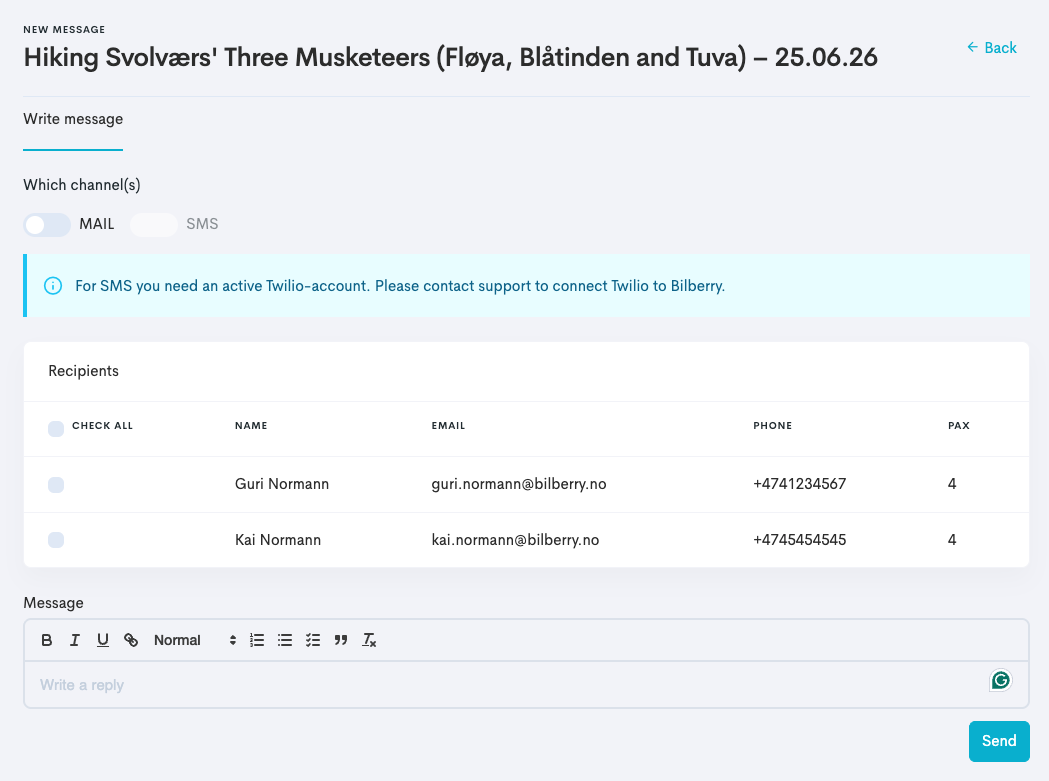
Toggle SMS as the channel you want to send a message by.
If you have not done the initial steps to activate your Twilio account and contacted Bilberry Support to connect, you will see a warning and not be able to toggle the SMS option on.
-
Select the recipients that should be receiving the message.
-
Type the message in the message field.
-
Click Send.
You will see the message that has been sent out in the Messages Sent overview.
Make sure all customer’s phone numbers in your Bilberry include the country code, e.g. +47 — SMS will fail without it.
Please note that this setup enables one-way communication only — from your company to your customers. Customers cannot reply to the SMS sent out.