Breadcrumbs

Widget Library

The Widget Library contains all our widgets and information about each of them. This includes key information about how the widget works, how it looks like, different parameters that can be used for customization and examples.

Currently, widgets are supported in the following languages:

  • English (default)

  • Norwegian

  • German

  • Spanish

  • French

  • Italian

  • Dutch

By default, the widgets will infer the language from the user’s browser settings. If the user has an unsupported language selected for the browser, the widgets will default to English.

After the configuration is set up, these are the steps to implement widgets to your website (CMS):

  1. Select the appropriate widget you’d like to use.

  2. Copy & paste the widget code into your CMS by the method your CMS requires.

  3. Edit the product code to match the bookable product in Bilberry.

  4. Save & place the widget where desired


Book Now Button


Code

<bilberry-booking-button></bilberry-booking-button>


Parameters and examples

size

optional

“s”, “m”, “l”
default: “s”

controls size on medium to large screens

<bilberry-booking-button size="m"></bilberry-booking-button>

xs-size

optional

“s”, “m”, “l”
default: “s”

controls size on small screens (mobile)

<bilberry-booking-button xs-size="s"></bilberry-booking-button>


Text Customization

If you’d like to change the text from “book now” to something else, use this customization key as done in the example below. This customization key must be set in the configuration code. Read more about text customization here.

button-text-customization-key

Text of the button

<bilberry-booking-button button-text-customization-key="booking-button"></bilberry-booking-button>
Wix Specific

Server-url

https://bilberry-widgets.b-cdn.net/v4/wix-wrappers/WixBilberryBookingButton.js

Tag name

wix-bilberry-booking-button


Skjermbilde 2023-10-09 kl. 09.45.25.png


Product List


Code

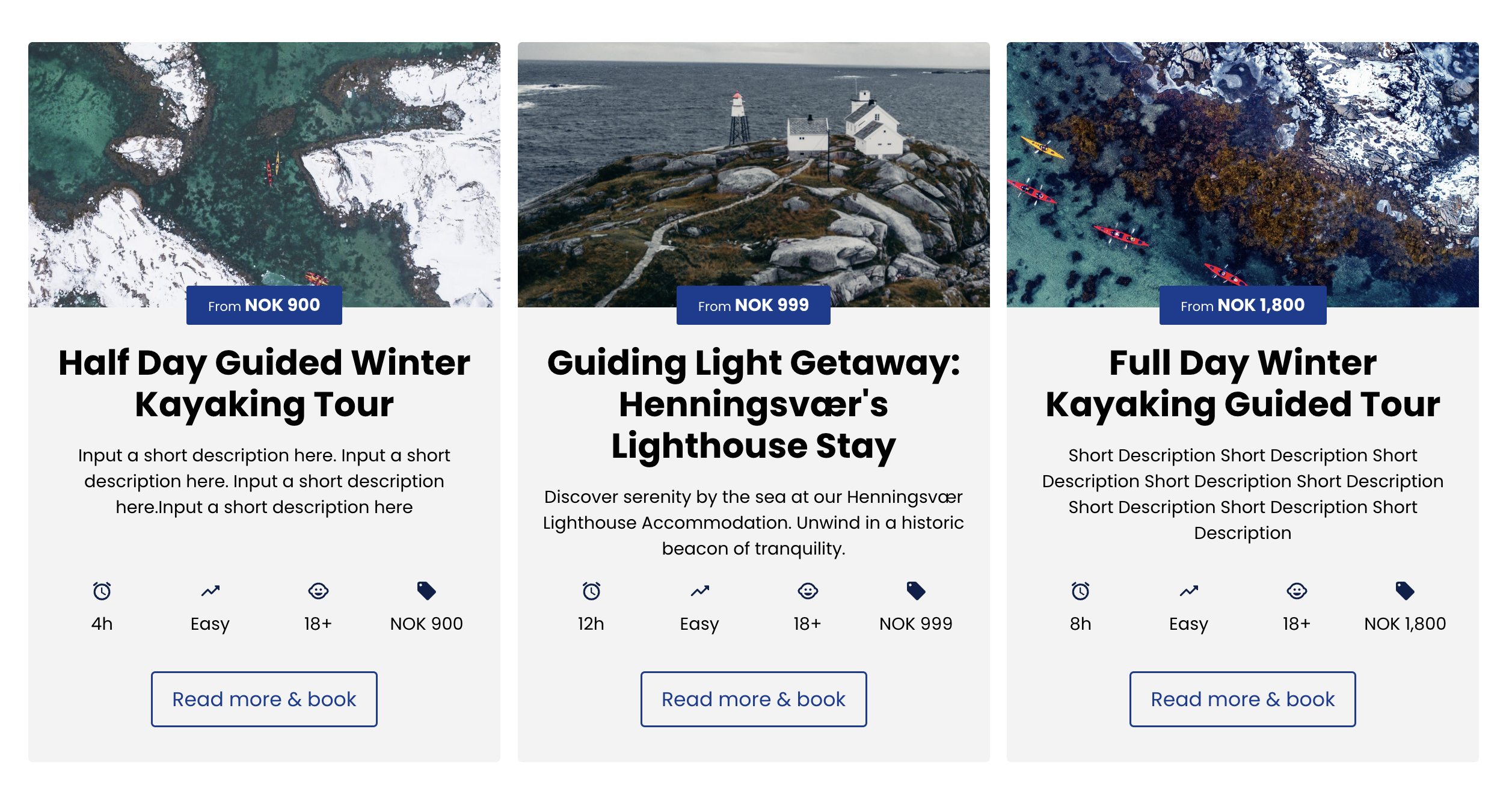
<bilberry-product-list product-catalog-ids="1,2,3"></bilberry-product-list>
:info:

Replace1”, “2” and “3” in the code provided, with your Bilberry product IDs (Found to the left of the product name in your product overview in Bilberry)


Parameters and examples


Examples

product-catalog-ids

required*

csv list of numbers

comma-separated list of product catalog ids found in Bilberry. [*] You must either specify this or (product-collection-id)

<bilberry-product-list product-catalog-ids="1,2,3"></bilberry-product-list>

product-collection-id

required*

number

The id of a product collection defined in Bilberry. [*] You must either specify this or (product-catalog-ids)

<bilberry-product-list product-collection-id="3" ></bilberry-product-list>


product-catalog-urls

optional

csv list of urls

If you need to overwrite the url to the “Read more and book”-buttons you can use a comma-separated list of urls to a product page for each product. The order of urls here must match the order in the product-catalog-ids parameter

<bilberry-product-list product-catalog-ids="1,2,3" product-catalog-urls="/page-1,/page-2,/page-3"></bilberry-product-list>


scroll

optional

“yes” | “no
default: “yes”

Scroll if “yes”, wrap if “no”

<bilberry-product-list product-catalog-ids="1,2,3" scroll="no"></bilberry-product-list>


num-xs

optional

number
default: 1

Cards visible per row on extra small screens (mobile).

<bilberry-product-list 
  product-catalog-ids="1,2,3"
  num-xs="1"
  num-sm="2"
  num-md="3"
  num-lg="4"
></bilberry-product-list>


num-sm

optional

number
default: 2

Cards visible per row on small screens (tablets).

<bilberry-product-list 
  product-catalog-ids="1,2,3"
  num-xs="1"
  num-sm="2"
  num-md="3"
  num-lg="4"
></bilberry-product-list>


num-md

optional

number
default: 2

Cards visible per row on medium screens (small desktop screens).

<bilberry-product-list 
  product-catalog-ids="1,2,3"
  num-xs="1"
  num-sm="2"
  num-md="3"
  num-lg="4"
></bilberry-product-list>


num-lg

optional

number
default: 3

Cards visible per row on large screens (large desktop screens).

<bilberry-product-list 
  product-catalog-ids="1,2,3"
  num-xs="1"
  num-sm="2"
  num-md="3"
  num-lg="4"
></bilberry-product-list>


background-colors

optional

csv list of colors

comma-separated list of html color codes to overwrite the colors of the product cards in the list

<bilberry-product-list product-catalog-ids="1,2,3" ></bilberry-product-list>


text-colors

optional

csv list of colors

comma-separated list of html color codes to overwrite the colors of the product cards in the list

<bilberry-product-list product-catalog-ids="1,2,3" ></bilberry-product-list>


primary-colors

optional

csv list of colors

comma-separated list of html color codes to overwrite the colors of the product cards in the list

<bilberry-product-list
    product-catalog-ids="1,2,3"
    background-colors="#395542,#1D252D,#333F48"
    text-colors="#FFFFFF,#FFFFFF,#FFFFFF"
    primary-colors="#183028,#333F48,#1D252D"
    primary-text-colors="#FFFFFF,#FFFFFF,#FFFFFF"
    accent-colors="#183028,#333F48,#1D252D"
    accent-text-colors="#FFFFFF,#FFFFFF,#FFFFFF"
></bilberry-product-list>


primary-text-colors

optional

csv list of colors

comma-separated list of html color codes to overwrite the colors of the product cards in the list

<bilberry-product-list
    product-catalog-ids="1,2,3"
    background-colors="#395542,#1D252D,#333F48"
    text-colors="#FFFFFF,#FFFFFF,#FFFFFF"
    primary-colors="#183028,#333F48,#1D252D"
    primary-text-colors="#FFFFFF,#FFFFFF,#FFFFFF"
    accent-colors="#183028,#333F48,#1D252D"
    accent-text-colors="#FFFFFF,#FFFFFF,#FFFFFF"
></bilberry-product-list>


accent-colors

optional

csv list of colors

comma-separated list of html color codes to overwrite the colors of the product cards in the list

<bilberry-product-list
    product-catalog-ids="1,2,3"
    background-colors="#395542,#1D252D,#333F48"
    text-colors="#FFFFFF,#FFFFFF,#FFFFFF"
    primary-colors="#183028,#333F48,#1D252D"
    primary-text-colors="#FFFFFF,#FFFFFF,#FFFFFF"
    accent-colors="#183028,#333F48,#1D252D"
    accent-text-colors="#FFFFFF,#FFFFFF,#FFFFFF"
></bilberry-product-list>


accent-text-colors

optional

csv list of colors

comma-separated list of html color codes to overwrite the colors of the product cards in the list

<bilberry-product-list
    product-catalog-ids="1,2,3"
    background-colors="#395542,#1D252D,#333F48"
    text-colors="#FFFFFF,#FFFFFF,#FFFFFF"
    primary-colors="#183028,#333F48,#1D252D"
    primary-text-colors="#FFFFFF,#FFFFFF,#FFFFFF"
    accent-colors="#183028,#333F48,#1D252D"
    accent-text-colors="#FFFFFF,#FFFFFF,#FFFFFF"
></bilberry-product-list>


Wix Specific

Server-url

https://bilberry-widgets.b-cdn.net/v4/wix-wrappers/WixBilberryProductList.js

Tag name

wix-bilberry-product-list

Skjermbilde 2023-10-09 kl. 11.01.34.png


Product List Bookable


Code

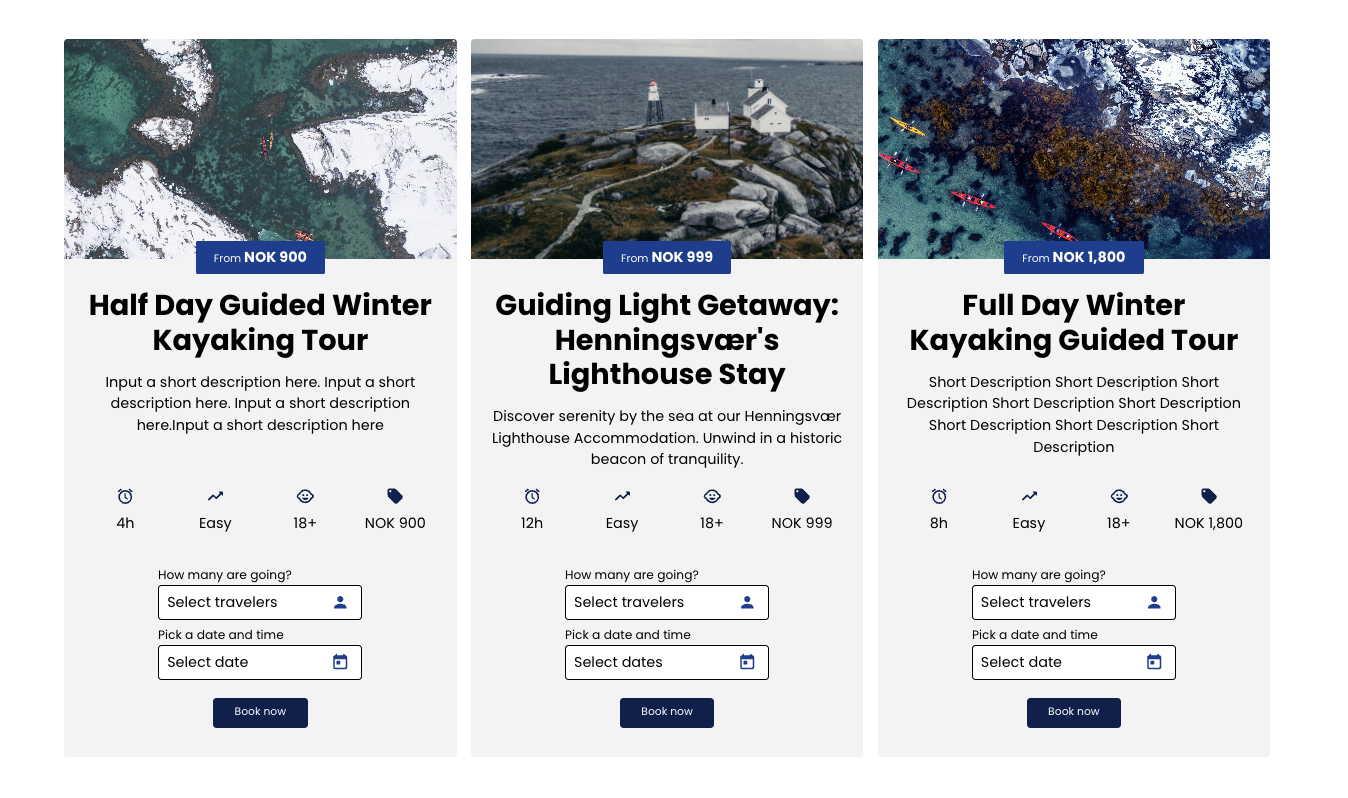
<bilberry-product-list-bookable product-collection-id="3" scroll="no"></bilberry-product-list-bookable>
:info:

Replace3” in the code provided, with your Bilberry product ID (Found to the left of the product name in your product overview in Bilberry)


Parameters and examples

product-collection-id

required

number

The id of a product collection defined in Bilberry backoffice.

<bilberry-product-list-bookable product-collection-id="3"></bilberry-product-list-bookable>

scroll

optional

“yes” | “no
default: “yes”

Scroll if “yes”, wrap if “no”

<bilberry-product-list-bookable product-collection-id="3" scroll="no"></bilberry-product-list-bookable>

num-xs

optional

number
default: 1

Cards visible per row on extra small screens (mobile).

<bilberry-product-list 
  product-catalog-ids="1,2,3"
  num-xs="1"
  num-sm="2"
  num-md="3"
  num-lg="4"
></bilberry-product-list>

num-sm

optional

number
default: 2

Cards visible per row on small screens (tablets).

<bilberry-product-list 
  product-catalog-ids="1,2,3"
  num-xs="1"
  num-sm="2"
  num-md="3"
  num-lg="4"
></bilberry-product-list>

num-md

optional

number
default: 2

Cards visible per row on medium screens (small desktop screens).

<bilberry-product-list 
  product-catalog-ids="1,2,3"
  num-xs="1"
  num-sm="2"
  num-md="3"
  num-lg="4"
></bilberry-product-list>

num-lg

optional

number
default: 3

Cards visible per row on large screens (large desktop screens).

<bilberry-product-list 
  product-catalog-ids="1,2,3"
  num-xs="1"
  num-sm="2"
  num-md="3"
  num-lg="4"
></bilberry-product-list>

background-colors

optional

csv list of colors

comma-separated list of html color codes

<bilberry-product-list
    product-catalog-ids="1,2,3"
    background-colors="#395542,#1D252D,#333F48"
    text-colors="#FFFFFF,#FFFFFF,#FFFFFF"
    primary-colors="#183028,#333F48,#1D252D"
    primary-text-colors="#FFFFFF,#FFFFFF,#FFFFFF"
    accent-colors="#183028,#333F48,#1D252D"
    accent-text-colors="#FFFFFF,#FFFFFF,#FFFFFF"
></bilberry-product-list>

text-colors

optional

csv list of colors

comma-separated list of html color codes

<bilberry-product-list
    product-catalog-ids="1,2,3"
    background-colors="#395542,#1D252D,#333F48"
    text-colors="#FFFFFF,#FFFFFF,#FFFFFF"
    primary-colors="#183028,#333F48,#1D252D"
    primary-text-colors="#FFFFFF,#FFFFFF,#FFFFFF"
    accent-colors="#183028,#333F48,#1D252D"
    accent-text-colors="#FFFFFF,#FFFFFF,#FFFFFF"
></bilberry-product-list>

primary-colors

optional

csv list of colors

comma-separated list of html color codes

<bilberry-product-list
    product-catalog-ids="1,2,3"
    background-colors="#395542,#1D252D,#333F48"
    text-colors="#FFFFFF,#FFFFFF,#FFFFFF"
    primary-colors="#183028,#333F48,#1D252D"
    primary-text-colors="#FFFFFF,#FFFFFF,#FFFFFF"
    accent-colors="#183028,#333F48,#1D252D"
    accent-text-colors="#FFFFFF,#FFFFFF,#FFFFFF"
></bilberry-product-list>

primary-text-colors

optional

csv list of colors

comma-separated list of html color codes

<bilberry-product-list
    product-catalog-ids="1,2,3"
    background-colors="#395542,#1D252D,#333F48"
    text-colors="#FFFFFF,#FFFFFF,#FFFFFF"
    primary-colors="#183028,#333F48,#1D252D"
    primary-text-colors="#FFFFFF,#FFFFFF,#FFFFFF"
    accent-colors="#183028,#333F48,#1D252D"
    accent-text-colors="#FFFFFF,#FFFFFF,#FFFFFF"
></bilberry-product-list>

accent-colors

optional

csv list of colors

comma-separated list of html color codes

<bilberry-product-list
    product-catalog-ids="1,2,3"
    background-colors="#395542,#1D252D,#333F48"
    text-colors="#FFFFFF,#FFFFFF,#FFFFFF"
    primary-colors="#183028,#333F48,#1D252D"
    primary-text-colors="#FFFFFF,#FFFFFF,#FFFFFF"
    accent-colors="#183028,#333F48,#1D252D"
    accent-text-colors="#FFFFFF,#FFFFFF,#FFFFFF"
></bilberry-product-list>

accent-text-colors

optional

csv list of colors

comma-separated list of html color codes

<bilberry-product-list
    product-catalog-ids="1,2,3"
    background-colors="#395542,#1D252D,#333F48"
    text-colors="#FFFFFF,#FFFFFF,#FFFFFF"
    primary-colors="#183028,#333F48,#1D252D"
    primary-text-colors="#FFFFFF,#FFFFFF,#FFFFFF"
    accent-colors="#183028,#333F48,#1D252D"
    accent-text-colors="#FFFFFF,#FFFFFF,#FFFFFF"
></bilberry-product-list>

hide-read-more

optional

“yes” | “no”
default: “no”

Set to “yes” in order to hide the “Les mer” link.

<bilberry-product-list-bookable product-collection-id="3" hide-read-more="yes"></bilberry-product-list-bookable>
Wix Specific

Server-url

https://bilberry-widgets.b-cdn.net/v4/wix-wrappers/WixBilberryProductListBookable.js

Tag name

wix-bilberry-product-list-bookable

Skjermbilde 2023-10-10 kl. 11.21.35.png


Skjermbilde 2023-10-10 kl. 11.22.01.png

Tour List Bookable


Code

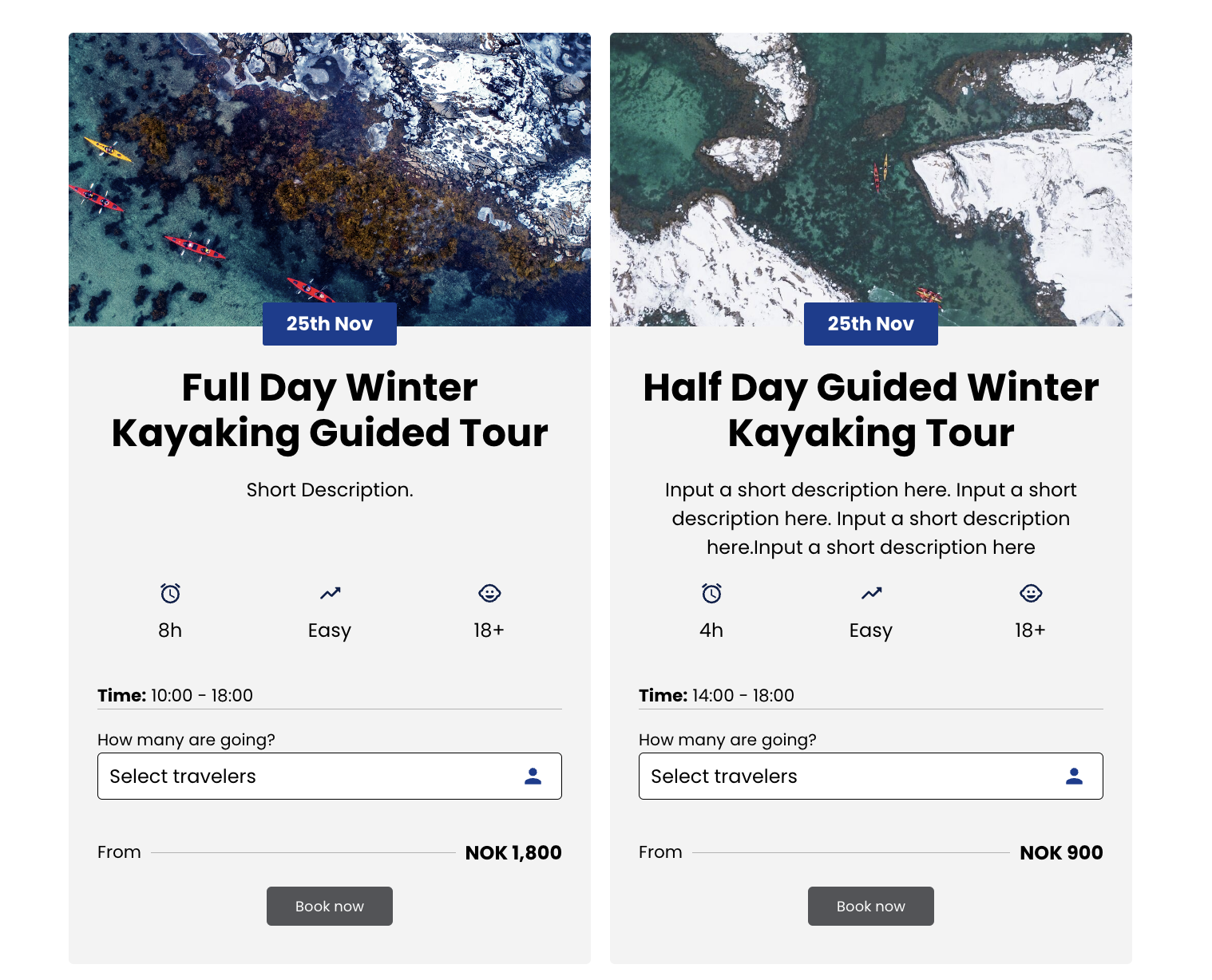
<bilberry-tour-list-bookable tour-ids="101123,101134"></bilberry-tour-list-bookable>
:info:

Replace101123,101134” in the code provided, with the Project number (Found in the top left within the specific joined trip overview in Bilberry):


Parameters and examples

tour-ids

required*

number

The id of a tour defined in Bilberry backoffice. [*]

<bilberry-tour-list-bookable tour-ids="101123,101134"></bilberry-tour-list-bookable>

scroll

optional

“yes” | “no
default: “yes”

Scroll if “yes”, wrap if “no”

<bilberry-tour-list-bookable
    tour-ids="101123,101134"
    scroll="no"
></bilberry-tour-list-bookable>

num-xs

optional

number
default: 1

Cards visible per row on extra small screens (mobile).

<bilberry-tour-list-bookable
    tour-ids="101123,101134"
    num-xs="1"
    num-sm="2"
    num-md="3"
    num-lg="4"
></bilberry-tour-list-bookable>

num-sm

optional

number
default: 2

Cards visible per row on small screens (tablets).

<bilberry-tour-list-bookable
    tour-ids="101123,101134"
    num-xs="1"
    num-sm="2"
    num-md="3"
    num-lg="4"
></bilberry-tour-list-bookable>

num-md

optional

number
default: 2

Cards visible per row on medium screens (small desktop screens).

<bilberry-tour-list-bookable
    tour-ids="101123,101134"
    num-xs="1"
    num-sm="2"
    num-md="3"
    num-lg="4"
></bilberry-tour-list-bookable>

num-lg

optional

number
default: 3

Cards visible per row on large screens (large desktop screens).

<bilberry-tour-list-bookable
    tour-ids="101123,101134"
    num-xs="1"
    num-sm="2"
    num-md="3"
    num-lg="4"
></bilberry-tour-list-bookable>

background-colors

optional

csv list of colors

comma-separated list of html color codes

<bilberry-tour-list-bookable
    tour-ids="101123,101134"
    background-colors="#395542,#1D252D,#333F48"
    text-colors="#FFFFFF,#FFFFFF,#FFFFFF"
    primary-colors="#183028,#333F48,#1D252D"
    primary-text-colors="#FFFFFF,#FFFFFF,#FFFFFF"
    accent-colors="#183028,#333F48,#1D252D"
    accent-text-colors="#FFFFFF,#FFFFFF,#FFFFFF"
></bilberry-tour-list-bookable>

text-colors

optional

csv list of colors

comma-separated list of html color codes

<bilberry-tour-list-bookable
    tour-ids="101123,101134"
    background-colors="#395542,#1D252D,#333F48"
    text-colors="#FFFFFF,#FFFFFF,#FFFFFF"
    primary-colors="#183028,#333F48,#1D252D"
    primary-text-colors="#FFFFFF,#FFFFFF,#FFFFFF"
    accent-colors="#183028,#333F48,#1D252D"
    accent-text-colors="#FFFFFF,#FFFFFF,#FFFFFF"
></bilberry-tour-list-bookable>

primary-colors

optional

csv list of colors

comma-separated list of html color codes

<bilberry-tour-list-bookable
    tour-ids="101123,101134"
    background-colors="#395542,#1D252D,#333F48"
    text-colors="#FFFFFF,#FFFFFF,#FFFFFF"
    primary-colors="#183028,#333F48,#1D252D"
    primary-text-colors="#FFFFFF,#FFFFFF,#FFFFFF"
    accent-colors="#183028,#333F48,#1D252D"
    accent-text-colors="#FFFFFF,#FFFFFF,#FFFFFF"
></bilberry-tour-list-bookable>

primary-text-colors

optional

csv list of colors

comma-separated list of html color codes

<bilberry-tour-list-bookable
    tour-ids="101123,101134"
    background-colors="#395542,#1D252D,#333F48"
    text-colors="#FFFFFF,#FFFFFF,#FFFFFF"
    primary-colors="#183028,#333F48,#1D252D"
    primary-text-colors="#FFFFFF,#FFFFFF,#FFFFFF"
    accent-colors="#183028,#333F48,#1D252D"
    accent-text-colors="#FFFFFF,#FFFFFF,#FFFFFF"
></bilberry-tour-list-bookable>

accent-colors

optional

csv list of colors

comma-separated list of html color codes

<bilberry-tour-list-bookable
    tour-ids="101123,101134"
    background-colors="#395542,#1D252D,#333F48"
    text-colors="#FFFFFF,#FFFFFF,#FFFFFF"
    primary-colors="#183028,#333F48,#1D252D"
    primary-text-colors="#FFFFFF,#FFFFFF,#FFFFFF"
    accent-colors="#183028,#333F48,#1D252D"
    accent-text-colors="#FFFFFF,#FFFFFF,#FFFFFF"
></bilberry-tour-list-bookable>

accent-text-colors

optional

csv list of colors

comma-separated list of html color codes

<bilberry-tour-list-bookable
    tour-ids="101123,101134"
    background-colors="#395542,#1D252D,#333F48"
    text-colors="#FFFFFF,#FFFFFF,#FFFFFF"
    primary-colors="#183028,#333F48,#1D252D"
    primary-text-colors="#FFFFFF,#FFFFFF,#FFFFFF"
    accent-colors="#183028,#333F48,#1D252D"
    accent-text-colors="#FFFFFF,#FFFFFF,#FFFFFF"
></bilberry-tour-list-bookable>

hide-read-more

optional

“yes” | “no”
default: “no”

Set to “yes” in order to hide the “Read more” link.

<bilberry-tour-list-bookable
    tour-ids="101123,101134"
    hide-read-more="yes"
></bilberry-tour-list-bookable>
Wix Specific

Server-url

https://bilberry-widgets.b-cdn.net/v4/wix-wrappers/WixBilberryProductOverview.js

Tag name

wix-bilberry-product-list-bookable


Skjermbilde 2023-11-10 kl. 09.55.57.png


Code

<bilberry-product-featured product-catalog-id="123"></bilberry-product-featured>
:info:

Replace3” in the code provided, with your Bilberry product ID (Found to the left of the product name in your product overview in Bilberry)


Parameters and examples

product-catalog-id

required

number

Id of the product catalog found in Bilberry

<bilberry-product-featured product-catalog-id="123"></bilberry-product-featured>

background-color

optional

color

Allow overriding default colors from theme

<bilberry-product-featured product-catalog-id="123"
  background-color="#395542"
  text-color="#FFFFFF"
  primary-color="#183028"
  primary-text-colors="#FFFFFF"
  accent-color="#183028"
  accent-text-color="#FFFFFF"
></bilberry-product-featured>

text-color

optional

color

Allow overriding default colors from theme

<bilberry-product-featured product-catalog-id="123"
  background-color="#395542"
  text-color="#FFFFFF"
  primary-color="#183028"
  primary-text-colors="#FFFFFF"
  accent-color="#183028"
  accent-text-color="#FFFFFF"
></bilberry-product-featured>

primary-color

optional

color

Allow overriding default colors from theme

<bilberry-product-featured product-catalog-id="123"
  background-color="#395542"
  text-color="#FFFFFF"
  primary-color="#183028"
  primary-text-colors="#FFFFFF"
  accent-color="#183028"
  accent-text-color="#FFFFFF"
></bilberry-product-featured>

primary-text-color

optional

color

Allow overriding default colors from theme

<bilberry-product-featured product-catalog-id="123"
  background-color="#395542"
  text-color="#FFFFFF"
  primary-color="#183028"
  primary-text-colors="#FFFFFF"
  accent-color="#183028"
  accent-text-color="#FFFFFF"
></bilberry-product-featured>

accent-color

optional

color

Allow overriding default colors from theme

<bilberry-product-featured product-catalog-id="123"
  background-color="#395542"
  text-color="#FFFFFF"
  primary-color="#183028"
  primary-text-colors="#FFFFFF"
  accent-color="#183028"
  accent-text-color="#FFFFFF"
></bilberry-product-featured>

accent-text-color

optional

color

Allow overriding default colors from theme

<bilberry-product-featured product-catalog-id="123"
  background-color="#395542"
  text-color="#FFFFFF"
  primary-color="#183028"
  primary-text-colors="#FFFFFF"
  accent-color="#183028"
  accent-text-color="#FFFFFF"
></bilberry-product-featured>

product-catalog-url

optional

url

Link url for “read more” button and image.

<bilberry-product-featured product-catalog-id="123"
  product-catalog-url="/page-1"
></bilberry-product-featured>
Wix Specific

Server-url

https://bilberry-widgets.b-cdn.net/v4/wix-wrappers/WixBilberryProductFeatured.js

Tag name

wix-bilberry-product-featured

Skjermbilde 2023-10-12 kl. 15.33.44.png


Leads Form


Code

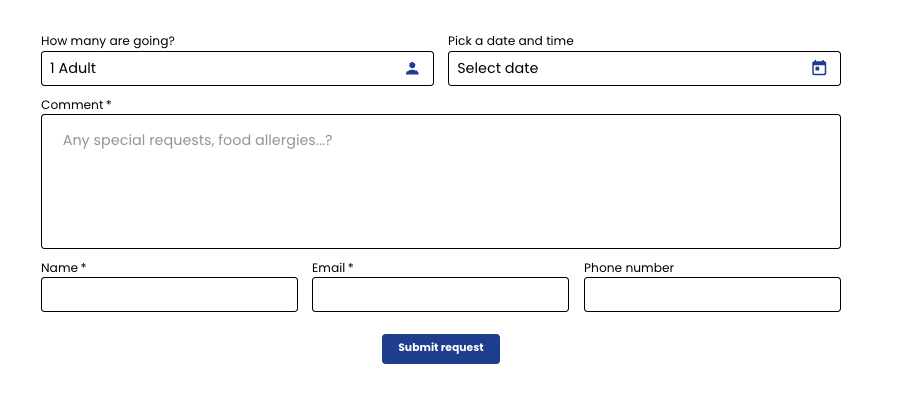
<bilberry-leads-form></bilberry-leads-form>


Parameters and examples

hide-request-date

optional

“yes”, “no”

default: “no”

Hides the date input field.

<bilberry-leads-form
  hide-request-date="yes"
></bilberry-leads-form>
Text Customizations Possible

If you’d like to change the text from “Any special requests, food allergies..?” to something else, use any customization key as done in the example below. This customization key must be set in the configuration code. Read more on: link to text customization page?

comment-placeholder-text-customization-key

<bilberry-leads-form
  comment-placeholder-text-customization-key="example_key_placeholder" 
></bilberry-leads-form>
Wix Specific

Server-url

https://bilberry-widgets.b-cdn.net/v4/wix-wrappers/WixBilberryLeadsForm.js

Tag name

wix-bilberry-leads-form


Skjermbilde 2023-10-12 kl. 15.41.50.png
Skjermbilde 2023-10-12 kl. 16.07.38.png


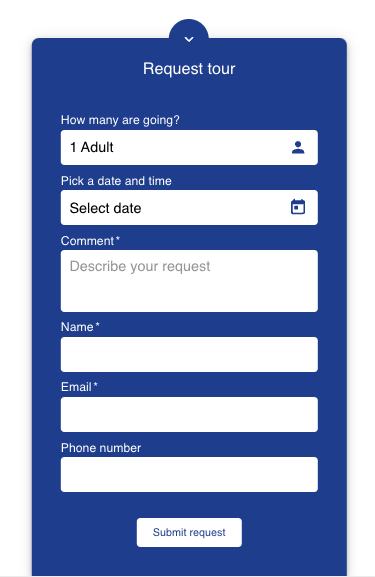
Request Tour

Code

<bilberry-request-tour></bilberry-request-tour>


Parameters and examples

hide-request-date

optional

“yes”, “no”

default: “no”

Hides the date input field.

<bilberry-request-tour hide-request-date="yes"></bilberry-request-tour>

expand-arrow-inside

Optional

“yes”, “no”

default: “no”

Specify whether the arrow at the top of the widget, should be on the outside, or inside.

<bilberry-request-tour expand-arrow-inside=yes"></bilberry-request-tour>

position-offscreen

optional

“yes”, “no”

default: “no”

Place the closed position below the bottom of the screen so nothing is showing until the popup is opened by the external button widget

<bilberry-request-tour position-offscreen="yes"></bilberry-request-tour>


Wix Specific

Server-url

https://bilberry-widgets.b-cdn.net/v4/wix-wrappers/WixBilberryRequestTour.js

Tag name

wix-bilberry-request-tour

Skjermbilde 2023-10-13 kl. 09.58.18.png
Skjermbilde 2023-10-13 kl. 10.04.34.png
Skjermbilde 2023-10-13 kl. 10.11.07.png
Skjermbilde 2023-10-11 kl. 08.22.12.png


Booking Search Form

Code

<bilberry-booking-search-form url="/activities"></bilberry-booking-search-form>
:info:

Replace/activities” in the code provided, with url to the page you would like the user to land on when clicking “Find activities”


Parameters and examples

url

required

url

User is navigated to this url when “Find activities” button is clicked.

<bilberry-booking-search-form url="/activities"></bilberry-booking-search-form>
Wix Specific

Server-url

https://bilberry-widgets.b-cdn.net/v4/wix-wrappers/WixBilberryBookingSearchForm.js

Tag name

wix-bilberry-booking-search-form


Skjermbilde 2023-10-13 kl. 10.22.31.png


Code

<bilberry-booking-search></bilberry-booking-search>

By default (no search criterias specified) all products with at least one available time slot will be listed.


Parameters and examples

num-xs

optional

number
default: 1

Cards visible per row on extra small screens (mobile).

<bilberry-booking-search 
  num-xs="1"
  num-sm="2"
  num-md="3"
  num-lg="3"
></bilberry-booking-search>

num-sm

optional

number
default: 2

Cards visible per row on small screens (tablets).

<bilberry-booking-search 
  num-xs="1"
  num-sm="2"
  num-md="3"
  num-lg="3"
></bilberry-booking-search>

num-md

optional

number
default: 2

Cards visible per row on medium screens (small desktop screens).

<bilberry-booking-search 
  num-xs="1"
  num-sm="2"
  num-md="3"
  num-lg="3"
></bilberry-booking-search>

num-lg

optional

number
default: 3

Cards visible per row on large screens (large desktop screens).

<bilberry-booking-search 
  num-xs="1"
  num-sm="2"
  num-md="3"
  num-lg="3"
></bilberry-booking-search>

primary-text-colors

optional

csv list of colors

comma-separated list of html color codes

<bilberry-booking-search
    background-colors="#395542,#1D252D,#333F48"
    text-colors="#FFFFFF,#FFFFFF,#FFFFFF"
    primary-colors="#183028,#333F48,#1D252D"
    primary-text-colors="#FFFFFF,#FFFFFF,#FFFFFF"
    accent-colors="#183028,#333F48,#1D252D"
    accent-text-colors="#FFFFFF,#FFFFFF,#FFFFFF"
></bilberry-booking-search>

accent-colors

optional

csv list of colors

comma-separated list of html color codes

<bilberry-booking-search
    background-colors="#395542,#1D252D,#333F48"
    text-colors="#FFFFFF,#FFFFFF,#FFFFFF"
    primary-colors="#183028,#333F48,#1D252D"
    primary-text-colors="#FFFFFF,#FFFFFF,#FFFFFF"
    accent-colors="#183028,#333F48,#1D252D"
    accent-text-colors="#FFFFFF,#FFFFFF,#FFFFFF"
></bilberry-booking-search>

accent-text-colors

optional

csv list of colors

comma-separated list of html color codes

<bilberry-booking-search
    background-colors="#395542,#1D252D,#333F48"
    text-colors="#FFFFFF,#FFFFFF,#FFFFFF"
    primary-colors="#183028,#333F48,#1D252D"
    primary-text-colors="#FFFFFF,#FFFFFF,#FFFFFF"
    accent-colors="#183028,#333F48,#1D252D"
    accent-text-colors="#FFFFFF,#FFFFFF,#FFFFFF"
></bilberry-booking-search>
Wix Specific

Server-url

https://bilberry-widgets.b-cdn.net/v4/wix-wrappers/WixBilberryBookingSearch.js

Tag name

wix-bilberry-booking-search

Skjermbilde 2023-10-22 kl. 16.14.39.png


Upcoming Tours

Code

<bilberry-upcoming-tours
    product-catalog-ids="1,2,3,4"
    number-of-days="50"
    few-left="10"
    title-text-customization-key="upcomingTours"
    disable-title="yes"
    group-by="month"
></bilberry-upcoming-tours>
:info:

Replace1,2,3,4” in the code provided, with your Bilberry product IDs (Found to the left of the product names in your product overview in Bilberry)


Parameters and examples

product-catalog-ids

required

csv list of numbers

comma-separated list of product catalog ids found in Bilberry.
Only these product catalogs will be searched for.

<bilberry-upcoming-tours
    product-catalog-ids="1,2,3,4"
></bilberry-upcoming-tours>

number-of-days

optional

number
default: 7

Number of days ahead to search.

<bilberry-upcoming-tours
    product-catalog-ids="1,2,3,4"
></bilberry-upcoming-tours>

few-left

optional

number
default: 5

If less capacity than this, a “Few left” status will be displayed.

<bilberry-upcoming-tours
    product-catalog-ids="1,2,3,4"
    few-left="10"
></bilberry-upcoming-tours>

group-by

optional

“day” | “month”
default: “day”

Group tours by their day or their month.

<bilberry-upcoming-tours
    product-catalog-ids="1,2,3,4"
    group-by="month"
></bilberry-upcoming-tours>

disable-title

optional

“yes” | “no
default: “no”

The heading above the list may be hidden with this option.

<bilberry-upcoming-tours
    product-catalog-ids="1,2,3,4"
    disable-title="yes"
></bilberry-upcoming-tours>

disable-grouping

optional

“yes” | “no
default: “no”

The grouping of tours by day or month may be disabled with this option.

<bilberry-upcoming-tours
    product-catalog-ids="1,2,3,4"
    disable-grouping="yes"
></bilberry-upcoming-tours>
Wix Specific

Server-url

https://bilberry-widgets.b-cdn.net/v4/wix-wrappers/WixBilberryUpcomingTours.js

Tag name

wix-bilberry-upcoming-tours

Skjermbilde 2023-10-17 kl. 20.20.25.png
Skjermbilde 2023-10-17 kl. 20.17.35.png
Skjermbilde 2023-10-17 kl. 20.21.39.png
Skjermbilde 2023-10-17 kl. 20.23.03.png

Gift Card Button

Code

<bilberry-gift-card-button></bilberry-gift-card-button>


Parameters and examples

size

optional

“s”, “m”, “l”
default: “s”

controls size on medium to large screens

<bilberry-gift-card-button size="m"></bilberry-gift-card-button>

xs-size

optional

“s”, “m”, “l”
default: “s”

controls size on small screens (mobile)

<bilberry-gift-card-button xs-size="s"></bilberry-gift-card-button>


Wix Specific

Server-url

https://bilberry-widgets.b-cdn.net/v4/wix-wrappers/WixBilberryGiftcardButton.js

Tag name

wix-bilberry-gift-card-button

Skjermbilde 2023-10-17 kl. 20.28.33.png


Basket

Code

<bilberry-basket-icon></bilberry-basket-icon>


The basket-icon will only be displayed when there are items in the cart.

You might want to add the widget somewhere it will get included on every page automatically, typically the site header section.


Parameters and examples

size

optional

“s”, “m”, “l”
default: “s”

controls size on medium to large screens

<bilberry-basket-icon
  size="l"
></bilberry-basket-icon>

xs-size

optional


controls size on small screens (mobile)

<bilberry-basket-icon
  xs-size="m"
></bilberry-basket-icon>

small-on-mobile

optional

“yes” | “no”
default: “no”

makes the basket smaller on mobile by only displaying the icon and not the text

<bilberry-basket-icon
  small-on-mobile="yes"
></bilberry-basket-icon>

variant

optional

“dense”

“dense” variant reduces padding and margin for the button.

More variants may be added later.

<bilberry-basket-icon
  variant="dense"
></bilberry-basket-icon>
Wix Specific

Server-url

https://bilberry-widgets.b-cdn.net/v4/wix-wrappers/WixBilberryBasketIcon.js

Tag name

wix-bilberry-basket-icon

Skjermbilde 2023-10-17 kl. 20.43.33.png
Skjermbilde 2023-10-17 kl. 20.51.28.png


Product

Code

<bilberry-product product-catalog-id="123"></bilberry-product>
:info:

Replace123” in the code provided, with your Bilberry product ID (Found to the left of the product name in your product overview in Bilberry)


Parameters and examples

product-catalog-id

required

number

Id of the product catalog found in Bilberry

<bilberry-product product-catalog-id="123"></bilberry-product>
Wix Specific

Server-url

https://bilberry-widgets.b-cdn.net/v4/wix-wrappers/WixBilberryProduct.js

Tag name

wix-bilberry-product


Skjermbilde 2023-10-17 kl. 21.05.00.png


Product Image

Code

<bilberry-product-image product-catalog-id="123"></bilberry-product-image>
:info:

Replace123” in the code provided, with your Bilberry product ID (Found to the left of the product name in your product overview in Bilberry)


Parameters and examples

product-catalog-id

required

number

Id of the product catalog found in Bilberry

<bilberry-product product-catalog-id="123"></bilberry-product>
Wix Specific

Server-url

https://bilberry-widgets.b-cdn.net/v4/wix-wrappers/WixBilberryProductImage.js

Tag name

wix-bilberry-product-image


Skjermbilde 2023-10-22 kl. 15.59.12.png


Product Details


Code

<bilberry-product-details product-catalog-id="123"></bilberry-product-details>
:info:

Replace123” in the code provided, with your Bilberry product ID (Found to the left of the product name in your product overview in Bilberry)


Parameters and examples

product-catalog-id

required

number

Id of the product catalog found in Bilberry

<bilberry-product product-catalog-id="123"></bilberry-product>
Wix Specific

Server-url

https://bilberry-widgets.b-cdn.net/v4/wix-wrappers/WixBilberryProductDetails.js

Tag name

wix-bilberry-product-details

Skjermbilde 2023-10-22 kl. 16.02.04.png


Code

<bilberry-product-gallery product-catalog-id="123"></bilberry-product-gallery>
:info:

Replace123” in the code provided, with your Bilberry product ID (Found to the left of the product name in your product overview in Bilberry)


Parameters and examples

product-catalog-id

required

number

Id of the product catalog found in Bilberry

<bilberry-product-gallery product-catalog-id="123"></bilberry-product-gallery>

num-xs

optional

number
default: 1

Images visible on extra small screens (mobile).

<bilberry-product-gallery 
  num-xs="1"
product-catalog-id="123"></bilberry-product-gallery>


num-sm

optional

number
default: 2

Images visible on small screens (tablets).

<bilberry-product-gallery 
  num-sm="2"
product-catalog-id="123"></bilberry-product-gallery>

num-md

optional

number
default: 3

Images visible on medium screens (small desktop screens).

<bilberry-product-gallery 
  num-xs="3"
product-catalog-id="123"></bilberry-product-gallery>

num-lg

optional

number
default: 3

Images visible on large screens (large desktop

<bilberry-product-gallery 
  num-lg="4"
product-catalog-id="123"></bilberry-product-gallery>
Wix Specific

Server-url

https://bilberry-widgets.b-cdn.net/v4/wix-wrappers/WixBilberryProductGallery.js

Tag name

wix-bilberry-product-gallery

Skjermbilde 2023-10-22 kl. 16.04.52.png


Product Overview

Code

<bilberry-product-overview product-catalog-id="123"></bilberry-product-overview>
:info:

Replace123” in the code provided, with your Bilberry product ID (Found to the left of the product name in your product overview in Bilberry)


Parameters and examples

product-catalog-id

required

number

Id of the product catalog found in Bilberry

<bilberry-product-overview product-catalog-id="123"></bilberry-product-overview>
Wix Specific

Server-url

https://bilberry-widgets.b-cdn.net/v4/wix-wrappers/WixBilberryProductOverview.js

Tag name

wix-bilberry-product-overview


Skjermbilde 2023-10-22 kl. 16.11.27.png